
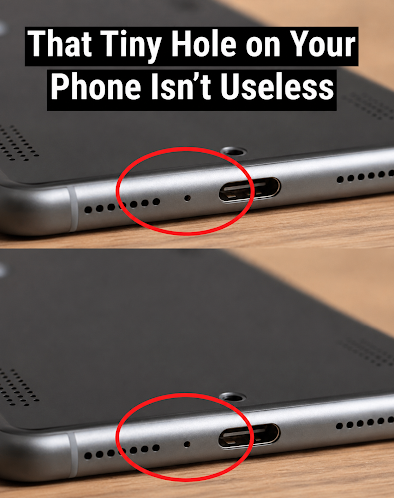
5. Is It the Same as the SIM Card Eject Hole?
No, not necessarily.
This is where many people become confused.
A SIM card tray has a small eject opening designed for a SIM removal tool. A microphone opening, on the other hand, is designed to allow sound to enter the device.
They may look similar, but they serve completely different purposes.
Always check the exact location of your SIM tray and microphone in your phone’s user manual before inserting any tool.
6. Why You Should Never Insert a Pin Into That Tiny Hole
This is probably the most important thing to remember.
Never assume that every tiny hole on your phone is designed for a SIM eject tool.
Inserting a pin, needle, or other sharp object into a microphone opening can damage the internal microphone or other delicate components.
If you think the opening is blocked, don’t try to clear it with a sharp object.
Follow your manufacturer’s cleaning instructions instead.
7. What Happens If Your Phone’s Microphone Gets Blocked?
A blocked microphone can cause several frustrating problems.
You might notice:
- People having difficulty hearing you.
- Muffled sound during phone calls.
- Poor audio quality in recorded videos.
- Voice messages that sound unusually quiet.
- Voice commands that don’t work properly.
Sometimes a phone case or protective film can cover the microphone opening without you realizing it.
Check that your accessories aren’t blocking the microphone.
How to Test Whether Your Phone’s Microphone Works
You can perform a simple test without downloading additional applications.
Step 1: Open your phone’s voice recording application.
Step 2: Record yourself speaking normally.
Step 3: Play the recording and listen carefully.
Step 4: Record a short video while speaking and check the audio.
If your voice sounds muffled or unclear, check the microphone openings and phone accessories.
If the problem continues, contact the manufacturer’s support team or a qualified repair technician.
Final Thoughts
That tiny hole next to your phone’s charging port might look unimportant, but it can serve a very useful purpose.
On many devices, it’s a microphone opening that helps capture your voice during calls, videos, and recordings.
The next time you notice it, remember that it isn’t necessarily a useless hole.
And please, don’t poke it with a needle or a pin!
Did you know that this tiny hole could be a microphone? Have you ever mistaken it for something else? Tell us in the comments!
